I finished the first tips and tricks article for the October issue of CompuQuickTips (due out the end of this month). It is going to be a fascinating ride. If you don't want to spend a lot of money on a graphics program, certainly get GIMP. It's free and, very competitive with the likes of PaintShop Pro and Photoshop.
Pick it up at http://www.gimp.org/windows/.
And make sure you save the next three issues of CompuQuickTips. They will help you cut to the chase and give you a good start.
Tuesday, September 26, 2006
Thursday, September 21, 2006
Customize Your Toolbars
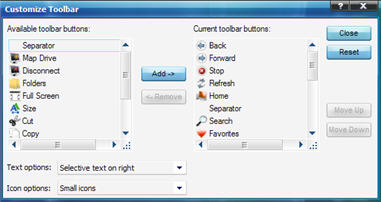
Your right mouse button is good for a lot of things. It gives you choices wherever you use it. Try right clicking on your Internet Explorer Toolbar (at the top of the main window) and choose Customize with a single left click. A new little window will open with extra buttons you may find handy. To add a button, left click on it in the left pane of the window and click the Add button. To remove a button, left click it on the right pane of the window and click the Remove button. You can also rearrange your tool buttons to suit your needs by clicking the button you want to move and clicking the up or down button. When you are finished, click the Close button and enjoy your new toolbar.


Saturday, September 09, 2006
Want a nice Sidebar?
Here's a little video that will show you how you can create a nice little retractable toolbar (sidebar) for your screen. You can use it to store all those icons, shortcuts and files you have been gathering and not knowing what to do with. The only thing you want to leave on your desktop is your trash bin. If you have an Internet Explorer or Outlook icon with no shortcut arrow on it, you can't just move those anywhere. They need to be removed a different way, so leave them alone.
New Toolbar Video from Mrs. Wizard
New Toolbar Video from Mrs. Wizard
Thursday, September 07, 2006
GEEZ!

I have spent the last two days managing updates and nursing a very sick ("Old Faithful") computer. Yesterday I had to remove it from our main office room to my little front office so it could be by itself and I could kick it if I need to. That meant, the laptop (little Trixie) was transferred to Old Faithful's place. Printer drivers had to be installed on little Trixie so we could still print via the network. In the meantime, Old Faithful will probably be hooked up tomorrow and I will see what I can do to ease it's misery. Poor thing has been stalling and freezing lately and I suspect more of a hardware (age related) problem than anything else. I could't even do a defrag on the thing yesterday when I finally gave up and decided to take it out of commission until I could figure out what is going on.
Sure is nice to have a large fambly of computers :)
Monday, September 04, 2006
Crocs Day
I am so tickled to have received a phone call from Charlie Neidner in Vero Beach today. He is a beloved reader and wanted to ask me about Crocs. I had recently put an Amazon Link to my favorite footwear on the September newsletter sidebar and Charlie wanted to know if I really liked them. Well I spent 20 minutes telling him how they were responsible for saving my feet. I really do love the way they feel. I have 4 pairs to date and can't count the number of miles I have put on them since my first pair. I do three miles a day around our neighborhood lake. I'll have to take the camera with me one day so I can share the beauty of this walk. At any rate, my crocs make my feet feel as though they are walking on sponges... Wonderful! And if the weather is wet, slogging through puddles is no problemo!
My FAVORITE Footwear!
Friday, September 01, 2006
Whew!
I'm sure my MSGTag STATUS will be talking to me all day, letting me know as soon as each person opens their newsletter. As for me, I'm going to be doing a little maintenance on the main machine today. It is overdue for a nice Defrag and Disk Cleanup.
Thursday, August 31, 2006
Cabinet of Curiosities
What a day! It was finally cool enough to take a nice long walk and not wilt. I'm listening to the 4th or 5th (they are all great) audio book (mp3 of course) by Preston and Child, Cabinet of Curiosities... they are all soooooo good. I have to keep my earbuds disinfected with Listerine so I don't end up with some kind of fungus in my ears from constantly being plugged in. Geez! I can't put a good book down. I make excuses to iron, do "quiet" cleaning, walking 3 miles a day (that's good for about an hour).
But listening to books is really kind to my eyes :)
It's time to send out the newsletter email. Enjoy folks!
But listening to books is really kind to my eyes :)
It's time to send out the newsletter email. Enjoy folks!
Wednesday, August 30, 2006
making Wallpaper
Well! Today is going to be a fun day! I am going to spend the entire day playing with GIMP to see what kind of wallpaper I can create for the Member area. Creating wallpaper images 1020 by 768 is a great way to put a graphics program through its paces and I usually end up with some pretty good results.
Monday, August 28, 2006
It reminds me of a MAC
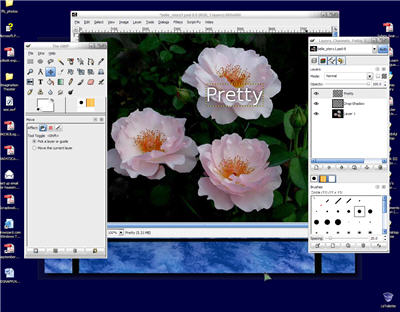
I neglected to send up the screenshot of GIMP on the desktop. It really reminds me of a Mac type program the way it sort of sits on the desktop with no containing window. I hate to say it, but that's about all the experience I have had with a Mac, just a few peeks. I have never had a lot of interest, and Windows has managed to keep me plenty stimulated.
Anyhow... Here is what GIMP looks like on my desktop!
Sunday, August 27, 2006
Almost finished
I just LOVE it! Every month when I am close to finishing the newsletter, I try to think of what I want to write about in the next issue. It is difficult at times. After so many years (over 10) of writing about Windows and computers, one would think I would run out of things to write about. NOT! It is amazing how there has never been a lack of new things to learn.
Just finished the article on GIMP for the September issue of CompuQuickTips and realized I need to spend a lot more time with it, learning and testing so I can share what I learn with YOU, dear readers. So if you like the introduction to GIMP in the September issue, look for much more detail in the next three issues after that. It is an exciting Image Manipulation Program and the more I tinker with it, the more I want to learn. I am as new to it as my dear readers will be, so it should prove to be a fun journey. I hope you all enjoy the journey as much as I will.
Just finished the article on GIMP for the September issue of CompuQuickTips and realized I need to spend a lot more time with it, learning and testing so I can share what I learn with YOU, dear readers. So if you like the introduction to GIMP in the September issue, look for much more detail in the next three issues after that. It is an exciting Image Manipulation Program and the more I tinker with it, the more I want to learn. I am as new to it as my dear readers will be, so it should prove to be a fun journey. I hope you all enjoy the journey as much as I will.
Friday, August 25, 2006
Blogger and Firefox
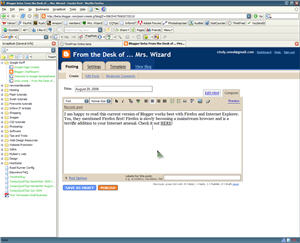
I am happy to read this current version of Blogger works best with Firefox and Internet Explorer. Yes, they mentioned Firefox first! Firefox is slowly becoming a mainstream browser and is a terrific addition to your Internet arsenal. Check it out HERE!
Wednesday, August 23, 2006
A learning curve
After lots of thinking, I have decided to feature GIMP as the September Gem. It is certainly not for beginners, but it is a great FREE alternative to Photoshop or PaintShop Pro if anyone wants to spend some time and can tolerate the learning curve. For more information the place to spend a lot of quality time is http://gimp.org/windows.
Tuesday, August 22, 2006
Zen Nano Plus
So much to learn! So little time!
I have ANOTHER Zen Nano Plus on the way. Should be here today. Seems I wore out my little black one (great excuse to order a new one in white this time). The sound when listening to an audio book has gone bad. While it is an intermittent problem, it is still a bit of a nuisance. The player is still good to use as a portable drive, so it will continue to live out its life with all the respect it deserves.
I have ANOTHER Zen Nano Plus on the way. Should be here today. Seems I wore out my little black one (great excuse to order a new one in white this time). The sound when listening to an audio book has gone bad. While it is an intermittent problem, it is still a bit of a nuisance. The player is still good to use as a portable drive, so it will continue to live out its life with all the respect it deserves.
Subscribe to:
Posts (Atom)