Pay particular attention to #17...
50 Awesome Blog Posts for the Kindle Addict
From their intro paragraph:
Kindle and the other e-readers on the market today have attracted swarms of ardent followers who enjoy their portability and convenience – not to mention the amount of money saved over time! Not surprisingly, those who enjoy the gadget flock to the internet to share their ideas and findings with others eager to learn as much as they can about their literary investment. The following blog posts cover a wide spectrum of information regarding Amazon’s revolutionary e-reader, with everything from hacks to charitable causes represented. Kindle enthusiasts hoping to get the most out of their beloved devices should certainly read and think about what they have to say.
Showing posts with label resources. Show all posts
Showing posts with label resources. Show all posts
Thursday, August 05, 2010
Tuesday, March 23, 2010
Viva Competition!
Originally posted March 23 , 2010 by Cindy O'Neal
Note: If you are reading this on your Kindle and want to get a book from the Kindle store now, type in the title, then toggle your 5-way switch to the right until store is highlighted. Press in on it to search. When the title comes up, make sure it is still free (or an acceptable price) before finally pressing in on the 5-way switch to "buy" it. You can always press the back button (before you press buy) if you change your mind.
And remember... what is FREE today may not be FREE tomorrow, so get it while you can!
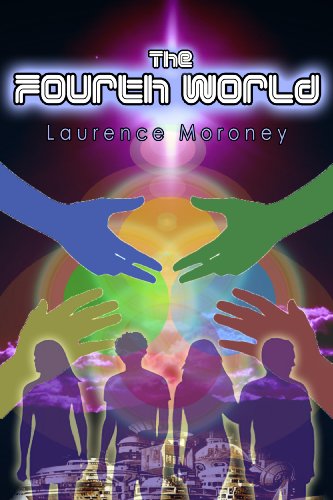
The Fourth World
Available on Barnes & Noble (free)
Amazon ($0.99)
Buried deep below the Nevada desert, in a place often called Area 51, is a very special and ancient school where the best and brightest children come to learn the technology that will bring mankind to its next step of evolution -- a place amongst the stars. 'The Fourth World' follows four children through their entry into this school: 'Fintan Reilly' is a young, often bullied Irish boy who has a big destiny; Zach Adams, from Fresno, is his diametric opposite, and instant best friend; Ayako Katsuragi is a brilliant Japanese girl, a military brat who is as capable as she is smart and Nizhoni Benally is a Navajo from New Mexico, who is as tough as she is beautiful, and who somehow shares a secret past with Fintan. The book follows their first year in their new school, with an Alien as headmaster, and where they learn everything from Cosmic History through to how to fly a flying saucer, and comes to a shocking conclusion in a field trip to Mars where ancient secrets are uncovered. (from Amazon.com)
This is interesting. This book is being offered FREE on Barnes & Noble but is 99 cents on Amazon.
Barnes & Noble books (including the free offerings) can be read with free BN apps on the iPod and iTouch, as well as on your PC or Mac (with free software easily found on the Barnes & Noble site). I just downloaded and installed the BN software on my pc with no problem at all. It is a very nice addition! It doesn't use a lot of resources and is easy to use. Actually it looks a bit more sophisticated than the Amazon software for the PC (which is still in beta I think).
Here is the Amazon listing:
I love my Kindle... but Viva Competition!
Note: If you are reading this on your Kindle and want to get a book from the Kindle store now, type in the title, then toggle your 5-way switch to the right until store is highlighted. Press in on it to search. When the title comes up, make sure it is still free (or an acceptable price) before finally pressing in on the 5-way switch to "buy" it. You can always press the back button (before you press buy) if you change your mind.
And remember... what is FREE today may not be FREE tomorrow, so get it while you can!
The Fourth World
Available on Barnes & Noble (free)
Amazon ($0.99)
Buried deep below the Nevada desert, in a place often called Area 51, is a very special and ancient school where the best and brightest children come to learn the technology that will bring mankind to its next step of evolution -- a place amongst the stars. 'The Fourth World' follows four children through their entry into this school: 'Fintan Reilly' is a young, often bullied Irish boy who has a big destiny; Zach Adams, from Fresno, is his diametric opposite, and instant best friend; Ayako Katsuragi is a brilliant Japanese girl, a military brat who is as capable as she is smart and Nizhoni Benally is a Navajo from New Mexico, who is as tough as she is beautiful, and who somehow shares a secret past with Fintan. The book follows their first year in their new school, with an Alien as headmaster, and where they learn everything from Cosmic History through to how to fly a flying saucer, and comes to a shocking conclusion in a field trip to Mars where ancient secrets are uncovered. (from Amazon.com)
This is interesting. This book is being offered FREE on Barnes & Noble but is 99 cents on Amazon.
Barnes & Noble books (including the free offerings) can be read with free BN apps on the iPod and iTouch, as well as on your PC or Mac (with free software easily found on the Barnes & Noble site). I just downloaded and installed the BN software on my pc with no problem at all. It is a very nice addition! It doesn't use a lot of resources and is easy to use. Actually it looks a bit more sophisticated than the Amazon software for the PC (which is still in beta I think).
Here is the Amazon listing:
The Fourth World (The Legend of the Locust) by Laurence Moroney (Kindle Edition - Oct. 1, 2009) - Kindle Book
Buy: $0.99
Auto-delivered wirelesslyI love my Kindle... but Viva Competition!


Monday, March 15, 2010
Free Books for ITouch
Originally posted March 15, 2010 by Cindy O'Neal
Free books from bn.com (Barnes & Noble)
It does not cost a thing to sign up for a Barnes & Noble account, and it will give you access to any free books they have available. They have the cutest little free app for your Iphone/Touch. If you have a Blackberry, they even have a little something for you! It is as easy to download, set up and connect to your BN account as the Kindle app is. AND it downloads any "purchases" (free or otherwise) to your IPhone/Touch automatically.
You don't have to have an IPhone or ITouch either. They have free software you can use on your pc too (beginning to sound familiar?).
Ahhhhh! Competition! Thy name is Barnes & Noble!
The Kindle is great, but with a price war for ebooks looming, a "quiet war" is beginning to take place. People are voting with their wallets and quietly letting publishers and resellers know they are not the only option. It has nothing to do with a "WalMart mentality," as some elitists have suggested. It is simply a case of common sense and not wanting to spend money unnecessarily.
Amazon is the main place I purchase books from. I have been happy with them for years, but I still remember the days when I could spend hours browsing the shelves at my local Barnes & Noble store, so I have a long-standing account with them too. If I find a book I really want for less there, I would certainly consider purchasing it for my ITouch. I have several of their free offerings and actually enjoy reading on my ITouch as much as the Kindle. It is a different experience, took a little getting used to, but still a good read. I also have the Kindle app on my ITouch, so I feel like I have the best of both worlds at my fingertips. Why not have both!
Let the games begin!
Free books from bn.com (Barnes & Noble)
It does not cost a thing to sign up for a Barnes & Noble account, and it will give you access to any free books they have available. They have the cutest little free app for your Iphone/Touch. If you have a Blackberry, they even have a little something for you! It is as easy to download, set up and connect to your BN account as the Kindle app is. AND it downloads any "purchases" (free or otherwise) to your IPhone/Touch automatically.
You don't have to have an IPhone or ITouch either. They have free software you can use on your pc too (beginning to sound familiar?).
Ahhhhh! Competition! Thy name is Barnes & Noble!
The Kindle is great, but with a price war for ebooks looming, a "quiet war" is beginning to take place. People are voting with their wallets and quietly letting publishers and resellers know they are not the only option. It has nothing to do with a "WalMart mentality," as some elitists have suggested. It is simply a case of common sense and not wanting to spend money unnecessarily.
Amazon is the main place I purchase books from. I have been happy with them for years, but I still remember the days when I could spend hours browsing the shelves at my local Barnes & Noble store, so I have a long-standing account with them too. If I find a book I really want for less there, I would certainly consider purchasing it for my ITouch. I have several of their free offerings and actually enjoy reading on my ITouch as much as the Kindle. It is a different experience, took a little getting used to, but still a good read. I also have the Kindle app on my ITouch, so I feel like I have the best of both worlds at my fingertips. Why not have both!
Let the games begin!
Thursday, March 11, 2010
Cooking with the Kindle
Originally posted March 11, 2010 by Cindy O'Neal
Made Over Dishes (Kindle Edition) by S. T. (Sarah Tyson Heston) Rorer (1849-1937)
Price: Free
A reviewer gave this book 4 stars, calling it a "waste not want not cookbook," just what we can use for the times we are living in.
This book is only about 60 pages long, but what an education!
and... continuing our education, thanks to Amazon's FREE ebooks... Eat historically and live longer?
Everyday Foods in War Time (Kindle Edition) by Mary Swartz Rose (Author)
And the frosting for the cake:
Etiquette (Kindle Edition) by Emily Post (1873-1960)
There are several on Amazon that are newer (and not free). If you want a feel for behavior in the early 20th century, go for the free one. When I did my search, it was the first one listed (but this could vary). The formatting is a little rough, but certainly readable.
Note: If you are reading this on your Kindle and want to get either of the cooking books now, type in the title, then toggle your 5-way switch to the right until store is highlighted. Press in on it to search the Kindle store. When the title comes up, make sure it is still free before finally pressing in on the 5-way switch to "buy" it. You can always press the back button (before you press buy) if you change your mind.
And remember... what is FREE today may not be FREE tomorrow, so get it while you can!
Made Over Dishes (Kindle Edition) by S. T. (Sarah Tyson Heston) Rorer (1849-1937)
Price: Free
A reviewer gave this book 4 stars, calling it a "waste not want not cookbook," just what we can use for the times we are living in.
This book is only about 60 pages long, but what an education!
and... continuing our education, thanks to Amazon's FREE ebooks... Eat historically and live longer?
Everyday Foods in War Time (Kindle Edition) by Mary Swartz Rose (Author)
And the frosting for the cake:
Etiquette (Kindle Edition) by Emily Post (1873-1960)
There are several on Amazon that are newer (and not free). If you want a feel for behavior in the early 20th century, go for the free one. When I did my search, it was the first one listed (but this could vary). The formatting is a little rough, but certainly readable.
Note: If you are reading this on your Kindle and want to get either of the cooking books now, type in the title, then toggle your 5-way switch to the right until store is highlighted. Press in on it to search the Kindle store. When the title comes up, make sure it is still free before finally pressing in on the 5-way switch to "buy" it. You can always press the back button (before you press buy) if you change your mind.
And remember... what is FREE today may not be FREE tomorrow, so get it while you can!
Sunday, March 07, 2010
Downloading 101 – Internet Explorer
Originally posted March 7, 2010
 To begin practicing, click any of the books on the front page. This will take you to a special page just for that book where you will see more information on it. If you would like to see more from that particular author, click the author's name at the top. If there are more from that author, there will be a link to a page with that author's other works listed, with links to the individual books on manybooks.net. Just below the image of the book cover, you should see a Download box with a little arrow to the right of the words select format. Click the little arrow to see the format choices (they will drop down when you left click the arrow). My personal choice is Mobipocket (.mobi) because the title stays pretty much intact, but Kindle (.azw), Mobipocket (.prc) and Plain text (.txt) are also easily used on your Kindle. Any of these four file types can be downloaded and transferred to your Kindle without conversion.


When your Kindle folder opens, click on the Documents folder to open it. Right in in any empty white area and choose Paste. This will put a copy of your book file right in the Documents folder on your Kindle, where it needs to be. Repeat the process for each book. Disconnect your Kindle from the computer and your new books should be at the top of your Home screen with the word New next to them.
Want More? If you find this helps, you can get a daily dose of helpful tips and tricks (not to mention great heads ups on free books) for your Kindle by subscribing and reading this on your little machine. Just type mrs wizard on your Kindle (no need for capital letters) and toggle your 5-way switch to the word store. Press in on the 5-way to search the store. You should see the From the Desk of Mrs. Wizard blog right away. Press in on the 5-way again to subscribe or toggle up to read more. Enjoy automatic delivery to your Kindle the first two weeks FREE!
Tomorrow: Downloading 101 - Firefox
find - download - put on Kindle
We will get a book from Manybooks.net, download it to your Desktop, then transfer it to your Kindle. Well, actually we won't. You will.
Do NOT confuse manybooks net with the same name but .com at the end of it. Whoever owns that domain name hasn't decided what to do with it yet.
Manybooks.net is a great place to find wonderful (free) books for your Kindle. You can graze for daze and never scratch the surface. It is one of my favorite watering holes.
If you have a PC, you have Internet Explorer to surf the Internet. Click the "big E" on your Desktop and you will be off and running. In the address box at the top of the Internet Explorer window, remove what is already there (http://whatever....) and type manybooks.net (no need to type the http:// stuff). Press the Enter key on your keyboard to go to the site. Browsers have come a long way in the last several years. You can type a web address without the http:// or www and your browser is smart enough to know you are typing in a web site as long as you don't forget the .net, .org or .com part... saves a lot of typing in the long run. The browser automatically puts the http:// part in so you don't have to.
When you arrive at the front page of manybooks.net, you will see there are lots of links to begin browsing with. If you know a particular title or author you would like to concentrate on, there is a search box just under the logo on the left. Click in it once (so you see a blinking cursor), then type what you are looking for and press the Enter key on your keyboard.

Left click on your file type choice. The drop down menu will disappear. Click the download button just below to begin your download. The next window you will see will be to choose to open or save the file. Choose Save by left clicking the Save button. You will then see another little window where you can choose where to put the file. I always choose Desktop because that way I don't have to go hunting for the files when I am ready. I use the Desktop as a staging area. After the files have been transferred to my Kindle, they are then either deleted or stored in a special folder in my main Documents folder, just for ebooks I have downloaded.


After you have chosen where you want to save your file, look at the bottom of that little window. You will see a File name box with the file name in it (don't change this.. just look) and you will see a File type box with the type of file in it (just look).
Click the Save button when you are satisfied all is well. The last little window you will see will tell you the download is complete. Click Close on that one and you will be ready to take your book file to your Kindle. Close your Internet Explorer browser window. You won't need it any more (unless you are going to get more books).
Taking it to the Kindle...
Find your book file on your Desktop, right click on it and choose Copy. Then connect your Kindle to your computer with the USB cable. Once connected, you should see a window with choices appear. Choose Open folder to view files with a single left click.
Want More? If you find this helps, you can get a daily dose of helpful tips and tricks (not to mention great heads ups on free books) for your Kindle by subscribing and reading this on your little machine. Just type mrs wizard on your Kindle (no need for capital letters) and toggle your 5-way switch to the word store. Press in on the 5-way to search the store. You should see the From the Desk of Mrs. Wizard blog right away. Press in on the 5-way again to subscribe or toggle up to read more. Enjoy automatic delivery to your Kindle the first two weeks FREE!
Tomorrow: Downloading 101 - Firefox
Saturday, February 20, 2010
Kindle resources
Originally posted February 20, 2010 by Cindy O'Neal
You know on mrswizard.com I have a special section just for nifty places to get free books for your Kindle and other great resources? Hmmmmm? You didn't?
Well, here it is!
There is a whole section just for the Kindle.
You know on mrswizard.com I have a special section just for nifty places to get free books for your Kindle and other great resources? Hmmmmm? You didn't?
Well, here it is!
There is a whole section just for the Kindle.
Subscribe to:
Posts (Atom)